Object Properties
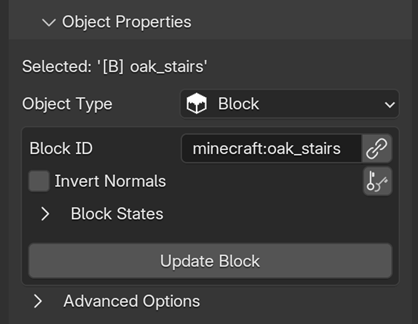
Here is where you edit the properties of your object. This panel is dynamic and changes depending on what Object Type the active object is. On this page, we will cover the general settings shared across all objects.
Active Object Name
At the top of the properties panel, you can see the name of the active object.

This name represents the target of your edits. By default, any changes made in this panel will only affect the active object shown here, although some specific tools allow you to apply properties to multiple selected objects at once.
When an object is created using Add Object , a prefix and a name are automatically assigned. The prefix indicates the object type. For example, [B] means it is a Block, and [E] means it is an Entity. This is followed by the object's ID (e.g. [B] oak_stairs, or [E] zombie).
To save resources and avoid interfering with your manual organization, these names and prefixes are only applied during creation or during an update (if the Rename On Update option is enabled in Assets Tab > Extras).
Object Type
This area is where you define how MC Animaker treats the object during export.

-
Not Set
The object will be completely ignored during export.
-
Block
The object is treated as a Block Display.
-
Entity
The object is treated as a standard entity.
-
Target
The object acts as an invisible coordinate point for entities to track.
Meshes
The exporter does not look at the actual 3D mesh of your object. The mesh in Blender is purely visual. For example, an object can have the 3D model of a block, but if its Object Type is set to Entity, it will be exported as an entity. The exporter relies entirely on the settings defined in this panel.
Mark as Target

This checkbox appears only when the Mode in the Export Tab is set to Target.
When enabled, all other entities in the scene will look towards this specific object during the animation. This property can be animated, allowing you to dynamically switch the focus of your entities from one target to another throughout the scene.
Specific Properties
This panel will automatically adapt its settings based on the selected Object Type:
- Block Properties: Edit block states, invert normals, and control in-game lighting.
- Entity Properties: Schedule custom commands and inject custom NBT data.
- Target Properties: Set up and manage invisible coordinate points.