Extras
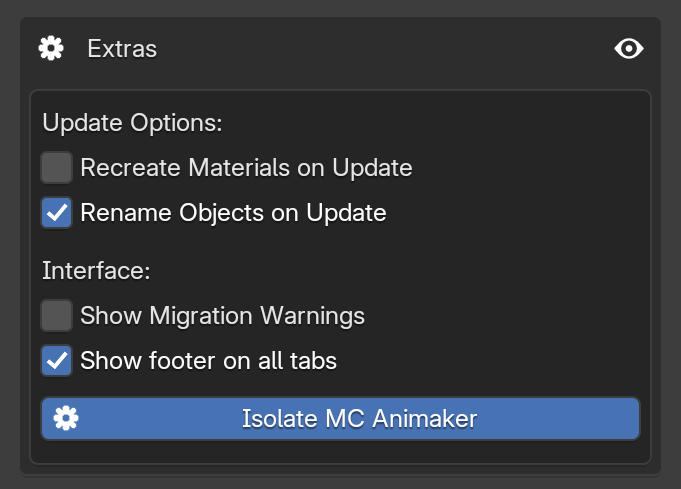
This area allows you to change the behavior of certain MC Animaker features. This panel is more niche and generally contains experimental functions or tools that do not have an established place elsewhere in the interface yet.
Update Options
These settings change how the Update Block button behaves when updating blocks.
-
Recreate Materials on Update
By default, MC Animaker reuses materials for blocks with the same ID to optimize performance. Enabling this option forces the block to completely rebuild its materials from scratch. This is exactly what you need to use to apply a new Resource Pack to blocks that are already in your scene, or to fix accidentally broken textures.
Performance Warning
While helpful, recreating materials can consume a significant amount of resources depending on the number of blocks being updated. To avoid lag spikes or Blender crashes, it is highly recommended to use this option only when necessary.
-
Rename Objects on Update
When enabled, this adds an extra logic step to the update button, forcing it to rename the object in the Outliner based on its current Block ID. While it does not consume many resources, it is disabled by default to prevent messing up your manual organization. Alternatively, you can rename all objects in bulk using the Cleanup Tools.
Interface
These options allow you to customize how MC Animaker integrates with your Blender workspace.
-
Show Migration Warnings
As MC Animaker evolves, structural changes or new features might be introduced. If an addon update has the potential to break compatibility with your current project, a red warning will appear, usually offering an automated fix. If you find these warnings intrusive or simply do not care about future compatibility, you can disable them here.
-
Show footer on all tabs
By default, the export controls (Scene Name and the Export button) only appear at the bottom of the Export Tab. Enabling this checkbox forces the footer to appear on all tabs, just like in legacy versions of MC Animaker.
-
Isolate MC Animaker
To keep the workspace clean and focused, MC Animaker automatically hides the native settings inside Blender's World Properties tab, leaving only the addon's panel visible. You can still use the addon normally with this disabled, but revealing the default options might clutter your screen. If you need to access native Blender features on this specific tab, simply disable this option.