Export Options
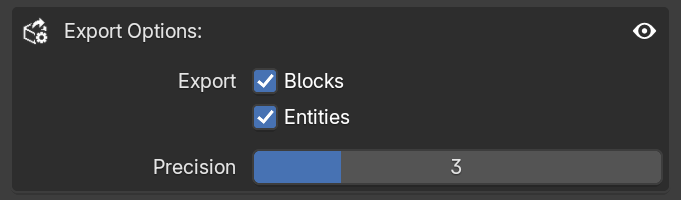
This area allows you to filter which objects are included in your final project and adjust the precision of the exported numbers.
Export
These checkboxes allow you to define which object types will be processed by the exporter.

- Blocks: When enabled, all blocks in your scene are included in the export.

- Entities: When enabled, all entities in your scene are included in the export.
This is useful for filtering reference objects. For example, if you are animating a camera shot and have blocks in your scene only as visual guides, you can uncheck Blocks to ensure they are not included in the final export. Alternatively, you can manually set the Object Type of specific objects to Not Set to exclude them individually.
Precision

The precision slider controls the number of decimal places used for all transformation data (position, rotation, and scale). This only affects the playback of the animation in-game.
- Default: By default, MC Animaker uses three decimal places (e.g.
1.123). This provides an ideal balance between accuracy and file size. - High Precision: You can increase this value up to 10 (e.g.
1.1234567890). Values above 6 are rarely necessary for standard animations. - Grid Precision: Uses zero decimal places (e.g.
1), rounding the numbers to the nearest whole integer. This makes the animation look completely "snapped to the grid".
File Size
Although it does not directly affect in-game performance, higher precision values will increase the .mcaproj file size. Depending on the case, a simple animation with a precision of 10 can take up more storage space than a complex animation using a precision of 3.